The short answer
Build a Notion worldbuilding wiki from a few full-page databases, such as Characters, Places and Factions, instead of a deep tree of nested pages. Give each database only the properties you will filter or sort by, connect the databases with two-way relations, and add rollups only for questions you actually ask. Gather open questions on a home page made of linked views, and add database templates once a page shape repeats. Before sharing or publishing, check permissions: publishing a page also publishes its subpages, and a CSV export turns relations into plain-text links.
Your Notion world began as a single page called “World”. Six months later it holds forty nested pages, three of them called “Misc”, and you cannot say who controls the sluice gate your plot depends on without opening half of them. Notion did nothing wrong. A page tree simply has no idea that a character belongs to a faction or lives in a place.
This guide builds a small wiki around those connections. It is based on Notion’s help center as checked on 11 October 2026, not on hands-on testing, and the layout is an editorial suggestion. The running example is Saltmere, an invented marsh town where two factions argue over the gates that keep the sea out of its salt pans.
Start with three databases, not a page tree#
In Notion, a database is a collection of pages. Every item you add is a full page you can write in, and properties label it with things like dates, status and links (Intro to databases). That is the shape a world wiki needs: Odile Sarr’s entry can hold a long backstory and still say, in a field you can filter, which faction she serves.
Create three full-page databases: Characters, Places and Factions. Full-page databases sit in the sidebar like any other page; inline ones live inside another page and hide their controls until you hover (Intro to databases). Saltmere starts with seven records:
- Characters: Odile Sarr, a sluice keeper; Casimir Lusk, agent of the salt merchants.
- Places: Saltmere, the Lower Pans, Gate Nine.
- Factions: the Tide Wardens, the Brine Guild.
Hold off on a fourth database. Religions, magic rules or events can stay ordinary pages until you have several and want to sort or filter them.
Give each database a few properties you will filter by#
A property earns its place when you filter, sort or group by it. Notion’s types include Text, Number, Select, Multi-select, Status, Date, Relation and Rollup; Select picks one option from a list and Multi-select picks one or more (Database properties). Everything else belongs in the page body.
| Database | Property | Type | Why it exists |
|---|---|---|---|
| Characters | Canon | Select: Settled, Open, Cut | Separates decisions from possibilities |
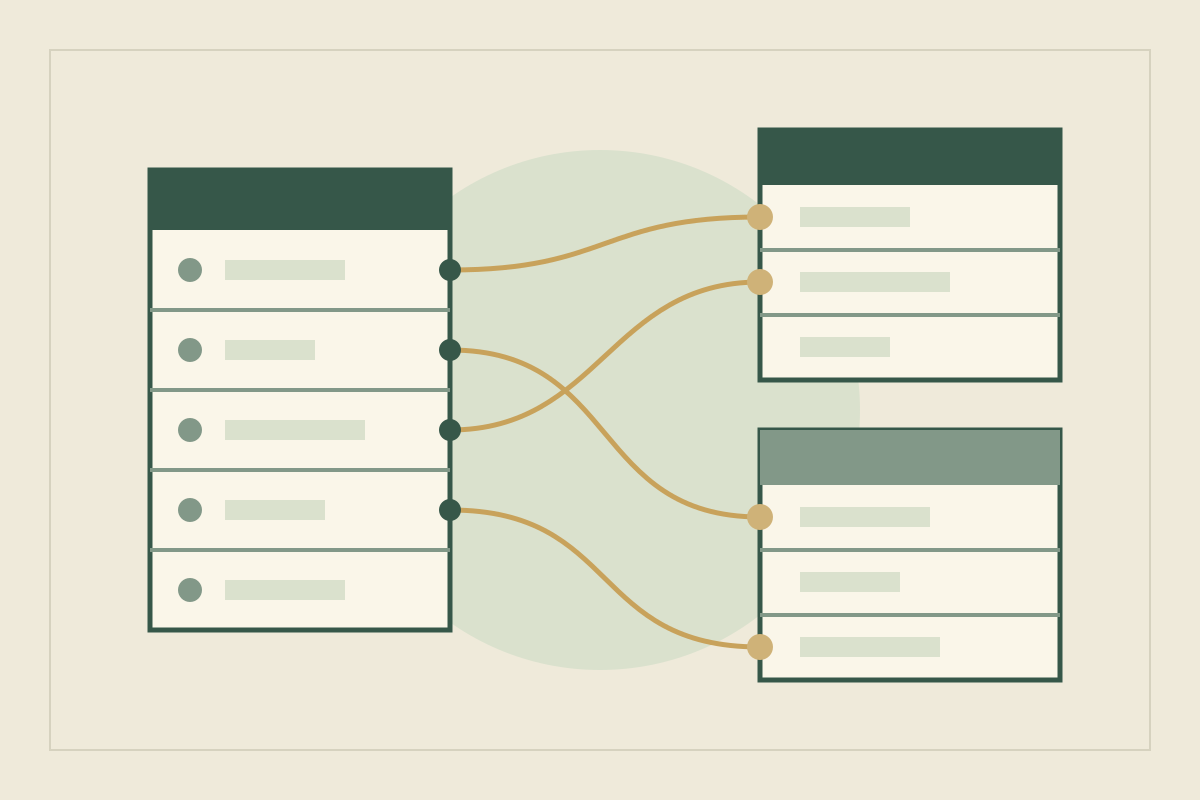
| Characters | Faction | Relation to Factions | Who answers to whom |
| Characters | Home | Relation to Places, limited to one page | Where to find them |
| Places | Controlled by | Relation to Factions | The plot’s central dispute |
| Factions | Wants | Text | One sentence of motive |
Canon does the most work. “Casimir might be Odile’s half-brother” stays Open until a scene settles it, and one filter shows every open question at once. If entries fill up with blank fields, the Customize page menu can hide a property whenever it is empty (Intro to databases).
Connect the databases with two-way relations#
A relation links items in different databases. Relations are one-way by default, but when you create one you can turn on “Show on [database name]”, which adds a matching property to the other database so edits work in both directions (Relations & rollups). Add Odile to the Tide Wardens from her page and she appears among the Wardens’ members without a second step.
Two settings suit worldbuilding. A relation can be limited to one page, which fits Home if each character has a single base. A database can also relate to itself: a Rivals relation on Characters links Casimir and Odile, and with two-way relation turned off, one property works in both directions (Relations & rollups).
Let the relation hold the fact. If Odile’s opening paragraph calls her “a Warden” and her Faction property later says Brine Guild, you have two answers and no way to tell which is current. The Obsidian notebook guide makes the same case for giving each fact one home.
Use rollups to answer questions you actually ask#
A rollup reads a property through a relation and calculates from it. Options include Show original, Show unique values and several counts, plus Sum, Min and Max for numbers (Relations & rollups). Add one only when it answers a question you keep asking.
In Saltmere, two earn their place:
- Which factions have people here? When you create Home, name its reverse property in Places “People here”. A rollup on People here that shows unique values of their Faction tells you Gate Nine holds both Wardens and Guild, which is exactly why the gate matters.
- How many named members does each faction have? In Factions, a Count all rollup on Members shows the Brine Guild has one. That is a hint it needs a second face before chapter seven.
The help center documents two limits: you cannot roll up a rollup, and a rollup can be sorted only when it outputs a number. If your world keeps its own calendar, a Number property for the year may serve better than a Date property, because Min and Max work on numbers. The timeline guide covers what that year field should record.
Build a home page from linked views#
The home page is where each session starts. Instead of copying lists onto it, add linked views of your databases. Views, filters, sorts and groups you change in a linked view leave the original database’s views alone, while edits to pages and properties reach the original (Data sources & linked databases).
Saltmere’s home page holds three:
- Open questions: Characters, filtered to Canon is Open.
- Who is where: Characters as a board grouped by Home.
- Chapter seven: Places, filtered to Gate Nine and the Lower Pans.
Each view keeps its own settings, and a filter can be saved for everyone or kept just for you (Views, filters, sorts & groups). The Calendar layout arranges items by a Date property, so a world without real-world dates may get little from it.
Before adding any new feature, match it to the question it answers:
| Your question | Notion feature | Saltmere example |
|---|---|---|
| Who belongs to which faction? | Two-way relation | Odile and the Tide Wardens list each other |
| Which factions have people at this place? | Rollup showing unique values | Gate Nine shows Wardens and Guild |
| What is still undecided? | Linked view filtered on a Select property | Canon is Open |
| Where does my prose mention this place? | @-mention and backlinks | Scene notes that name Gate Nine |
| How do I add another entry of a known kind? | Database template | The character template below |
Add a database template once a page shape repeats#
Write the first three character pages by hand. Once you know which headings you fill, turn them into a template: open the dropdown next to New, choose + New template, then set property values and page content. A template can contain any type of content, and it is available only in the database where you made it (Database templates).
A Saltmere character template might hold Canon set to Open and four headings:
What they want
What they fear
What they know that others do not
Story use
Leave relation properties empty in the template. Notion’s help warns that a filled relation makes every page created from it relate to the same existing page, so every new character would quietly join the Tide Wardens. The character guide suggests which questions are worth a heading.
Follow one change through Saltmere#
In your third draft, you decide the Brine Guild bribed its way into controlling Gate Nine before the storm. Carry the change through:
- On Gate Nine, change Controlled by from Tide Wardens to Brine Guild. The relation is two-way, so the Guild’s page updates too.
- Open Gate Nine’s backlinks. Notion creates a backlink every time you @-mention a page and shows backlinks under its title, or among the properties of a database page (Links & backlinks). A scene note reading “@Gate Nine is the Wardens’ pride” is now wrong.
- Search the workspace for phrases such as “Wardens’ gate”. Plain text that never mentioned the page leaves no backlink.
- Check Odile. If she still guards a gate her faction no longer controls, set the question to Open rather than patching scenes from memory.
Step two works only if you @-mention places instead of typing their names. Build that habit on the first page, not the fortieth.
Fix the mistakes that make a Notion wiki go stale#
| Mistake | Fix |
|---|---|
| Nesting pages five levels deep | Keep entries in databases and use the home page for navigation |
| One database for nobles, another for commoners | One Characters database with a Select property |
| Twenty properties on every entry | Keep the ones you filter by; hide empty ones |
| Typing a place name instead of mentioning it | @-mention it so backlinks can find it |
| Filling a relation in a template | Leave it empty and set it on each page |
| Publishing a wiki with secrets inside it | Publishing a page also publishes its subpages, so move secrets out or restrict them first (Notion Sites) |
| Treating a CSV export as a complete backup | Relations export as plain-text URLs, and for now the CSV cannot re-create them on import (Relations & rollups) |
Scale the wiki to the project and the people#
One novel. Three databases and a home page are usually enough. Add Lore or Events as a fourth database only when you have a dozen entries of that kind.
A series. Add a Books database and an Appears in relation from Characters, and a Count all rollup shows who has carried more than one book. The series bible guide covers what a series reference must record.
Writing away from a connection. Offline use works in Notion’s desktop and mobile apps, not in a browser. You mark pages Available offline; their subpages do not download automatically, and a database brings only the first 50 rows of its first view (Use pages offline). Put the view you need most first.
A co-writer or a game group. Permission levels include Can edit content, which lets someone create and edit pages and property values in a database without changing its structure, and Can view, which is read-only. Guests need their own Notion account (Sharing & permissions). Lock database stops others changing properties and option values (Intro to databases). A filtered linked view is not a privacy control: it follows the access level of the original database, and people need access to that database to see it at all. Keep spoilers on pages your players cannot open.
Keeping a copy. Version history restores earlier versions of a page, but how far back it reaches depends on your plan (Delete & restore content). You can also export pages as HTML, PDF, or Markdown with CSV for databases (Export your content). Export the wiki now and then, and open the files to see what survived.
Sources
- Notion: Intro to databases · October 11, 2026
- Notion: Database properties · October 11, 2026
- Notion: Relations & rollups · October 11, 2026
- Notion: Data sources & linked databases · October 11, 2026
- Notion: Views, filters, sorts & groups · October 11, 2026
- Notion: Database templates · October 11, 2026
- Notion: Links & backlinks · October 11, 2026
- Notion: Publish a website with Notion Sites · October 11, 2026
- Notion: Use pages offline · October 11, 2026
- Notion: Sharing & permissions · October 11, 2026
- Notion: Export your content · October 11, 2026
- Notion: Delete & restore content · October 11, 2026